유사사진 추천 기능을 구현해야해서 몇 주 전에 여러가지 방법을 찾았었다.
결국 생각해낸 방법 중 채택 된 것이 사진을 자동으로 태깅해서 Opensearch에 인덱싱 해놓고 태그를 기준으로 검색해서 비슷한 사진을 찾는 것이었다. 얼마전 PoC 진행했던 것을 간단히 기록으로 남기는 게 좋겠다 생각했다.
Azure vision으로 사진 태깅하기
azure computer vision은 사진과 동영상으로부터 여러가지 정보를 추출해주는 AI 서비스이다.
이 서비스를 이용하여 사진에 자동으로 태그를 달고, 설명을 달아줄 수 있다.
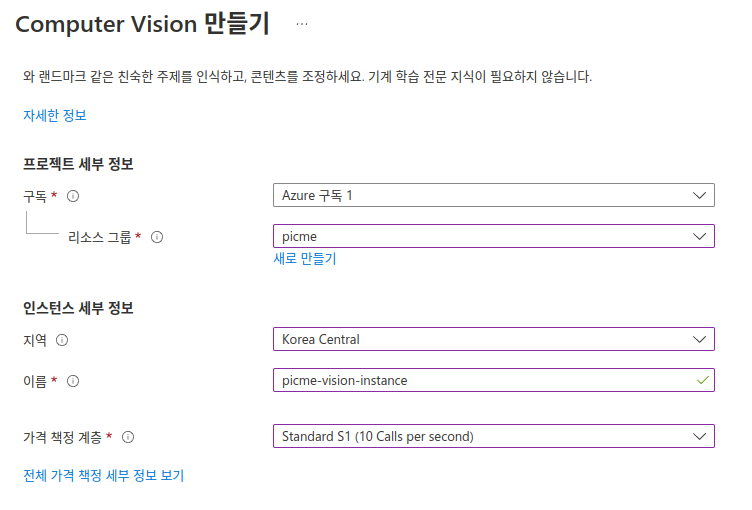
azure 클라우드 콘솔에서 Computer Vision 인스턴스를 아래와 같이 생성한다.
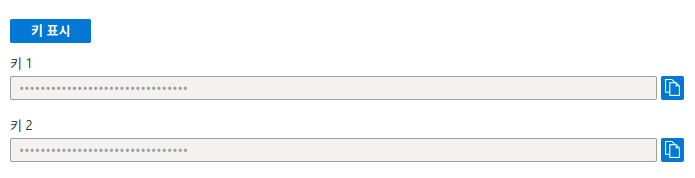
생성된 인스턴스의 상세 정보에서 '키 및 엔드포인트'를 선택하면 api access 키를 확인할 수 있다.
Azure computer vision 인스턴스에 접근할 수 있게끔 sdk를 제공한다. 나는 python으로 코드를 작성했다.
이미지는 s3에 저장하기 때문에 url 형태로 이미지를 제공하여 응답받는 형태로 만들었다.
pip을 이용해서 azure-cognitiveservices-vision-computervision 라이브러리를 설치 후 원하는 기능만 쓸 수 있도록 간단히 패키지를 작성했다.
from azure.cognitiveservices.vision.computervision import ComputerVisionClient
from azure.cognitiveservices.vision.computervision.models import OperationStatusCodes
from azure.cognitiveservices.vision.computervision.models import VisualFeatureTypes
from msrest.authentication import CognitiveServicesCredentials

class client:
    def __init__(self,subscription_key,endpoint):
        self.computervision_client = ComputerVisionClient(endpoint, CognitiveServicesCredentials(subscription_key))

    def get_tags(self,remote_image_url):
        tags_result_remote = self.computervision_client.tag_image(remote_image_url )
        return [tag.name for tag in tags_result_remote.tags]

    def get_desc(self,remote_image_url):
        capations_result_remote = self.computervision_client.describe_image(remote_image_url)
        return [caption.text for caption in capations_result_remote.captions]
아래처럼 임포트해서 사용해 볼 수 있다.
from VisionHandler import handler

subscription_key = "***********************************"
endpoint = "https://*****.cognitiveservices.azure.com/"

client = handler.client(subscription_key,endpoint)

image_url='https://picsum.photos/400/400'

desc = client.get_desc(image_url)
tags = client.get_tags(image_url)

print(desc,tags)
이제 서버에서 s3에 사진을 업로드하면, aws lambda에서 db에 태그와 설명을 업데이트 할 수 있게해야한다.
하지만 빠른 결과를 보기위해 태그와 설명을 직접 DB에 인서트 하였다.
Opensearch에 태그와 설명 정보 인덱싱하기
그 후 아래 글에서처럼 AWS Opensearch 인스턴스에 인덱싱하였다.
AWS lambda로 Opensearch index 생성하기
오늘은 Opensearch 데이터 인덱싱을 하는 람다 패키지를 만들어 배포했다. 기존에는 gcp kubernetes 환경에서 logstash를 이용하여 인덱싱을 했었다. 초기 개발비용 감소와 관리 포인트 감소의 장점이 있
blog.aug18th.com
Opensearch More Like This 쿼리로 비슷한 사진 찾기
Opensearch에 인덱싱은 아래처럼 되어있다.
{
"id" : 1,
...
"lat" : 38.06797947502193,
"lng" : 127.64364900163397,
"tags" : [
    "human face",
    "person",
    "clothing",
    "tree",
    ...
    ]
}
tags의 내용에 기반한 유사 사진 검색을 위해 more like this 쿼리를 사용했다.
입력값 중 일부로 query를 만들어서 검색하여 비슷한 document를 찾는다고 한다.
자세한 사용법은 가이드에서 참고했다.
https://www.elastic.co/guide/en/elasticsearch/reference/current/query-dsl-mlt-query.html
More like this query | Elasticsearch Guide [8.3] | Elastic
The fields on which to perform MLT must be indexed and of type text or keyword`. Additionally, when using like with documents, either _source must be enabled or the fields must be stored or store term_vector. In order to speed up analysis, it could help to
www.elastic.co
도큐먼트 내용대로 쿼리를 작성했다.
텍스트 배열 필드인 tags와 텍스트 필드인 generatedDesc를 기준으로 _id 1인 document와 비슷한 사진을 photos 인덱스에서 검색하는 내용이다.
min_term_freq는 최소 매칭되어야하는 query term의 갯수이고 이보다 적게 매칭된 document는 무시된다.
max_query_terms는 쿼리에 사용되는 최대 term의 갯수이고 쿼리는 정확해지지만 성능과 트레이드오프가 있다고 한다.
GET /photos/_search
{
  "query": {
    "more_like_this": {
      "fields": ["tags", "generatedDesc"],
      "like": [
        {
          "_index": "photos",
          "_id": 1
        }
      ],
      "min_term_freq": 1,
      "max_query_terms": 12
    }
  }
}
Opensearch 콘솔에서 정상적으로 응답이 온다

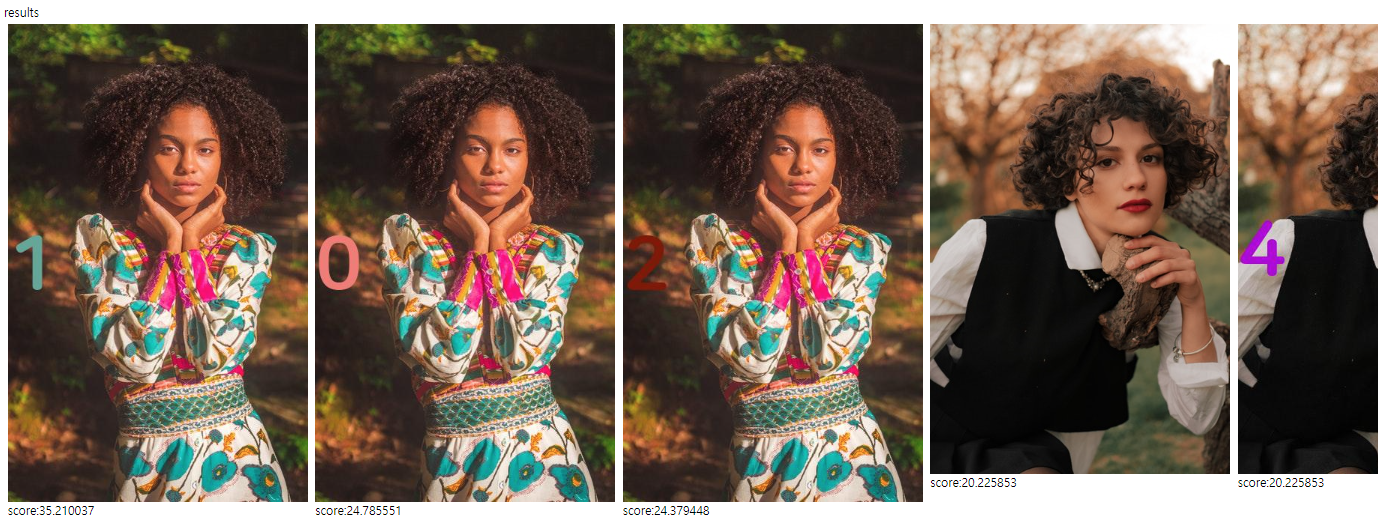
개발 중인 서비스에서 사진은 Stack이라는 묶음에 포함이 되어있는데, 한 묶음의 사진의 유형이 비슷하기 때문에
너무 서로 비슷한 사진들이 조회되는 문제가 있었다. 저 테스트 데이터 이미지 옆의 숫자는 같은 묶음의 사진이다.
따라서 한 묶음 당 한 장씩만 조회되도록 해야했는데 Collapse 키워드를 사용하여 처리했다.
stackId 필드가 사진 묶음의 아이디를 나타낸다. stackId 필드로 collaspe 한 결과 해당 문제가 해결되었다.
GET /photos/_search
{
  "query": {
    "more_like_this": {
      "fields": ["tags", "generatedDesc"],
      "like": [
        {
          "_index": "photos",
          "_id": 1
        }
      ],
      "min_term_freq": 1,
      "max_query_terms": 12
    }
  },
  "collapse": {
    "field": "stackId"
  }
}
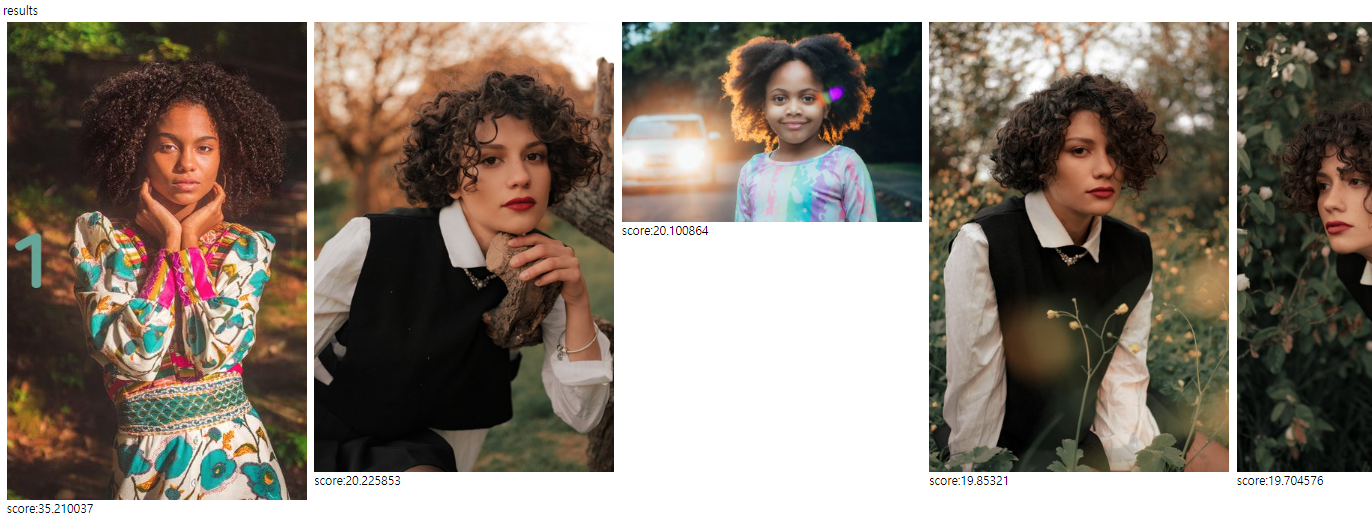
성공~