같은 채팅방에 참여한 사람들끼리만 서로의 메시지가 전달되도록 하는 기능이 필요하다.
서버에서 채팅방을 구현하는 로직을 생각해봤다.
- 유저가 채팅방에 입장하면 서버 중 한 곳에 소켓연결이 된다.
서버는 유저가 접속한 채널을 저장한다. - 연결된 서버는 채팅방 아이디가 서버의 채널목록에 있는 지 확인하고 없으면 redis client가 채널을 subscribe 한다.
- 유저가 전송하는 메시지는 유저가 접속한 채팅방에 해당하는 채널에 publish한다.
- 유저가 퇴장하면 서버와 연결이 해제된다.
서버는 이 유저가 접속한 채널에 접속한 사람이 아직 있는 지 확인하고 없으면 unsubscribe 한다.
채팅방 성능??
subscribe와 unsubscribe는 비교적 적게 발생하므로 상관없지만 publish 성능은 따져봐야한다.
문서에 따르면 redis publish api 의 시간복잡도는 O(N+M)이다.
publish: O(N+M) where N is the number of clients subscribed to the receiving channel and M is the total number of subscribed patterns.
채팅방이 없다면 채널 수가 1개여서 채널 수 M이 무시되고, 채팅방이 있다면 한 채팅방에 두 명만 입장 가능하기 때문에 채널 당 유저 수 N은 무시된다.
따라서 유저 수가 N일 때, 채팅방이 없는 경우와 있는 경우의 시간복잡도를 비교해보면 아래와 같다.
| API | 채팅방 없을 때 | 채팅방 있을 때 |
| publish | O(N + 1) = O(N) | O(2 + N/2) = O(N) |
채팅방이 시간복잡도에는 영향을 주지 않음을 확인할 수 있다.
구현하기
먼저 유저와 채팅방 정보를 저장하기 위해 map을 만든다
//유저가 속한 방을 저장
const userInfo: Map<string, string> = new Map()
//방에 속한 유저들을 저장
const roomInfo: Map<string, Set<string>> = new Map()
그리고 join_room 이벤트로 방에 입장할 수 있게한다. roomInfo에 유저를 저장하고 소켓을 room에 입장시킨다.
//채팅방 접속
socket.on("join_room", async (data) => {
    //유저에 채널 저장
    userInfo.set(socket.id, data)
    if (roomInfo.has(data)) {
        roomInfo.get(data)?.add(socket.id)
    } else {
        sub.subscribe(data)
        roomInfo.set(data, new Set([socket.id]))
    }
    await socket.join(data)
이제 메시지를 전송할 때는 유저가 속한 채널을 찾아서, 해당 채널로 redis에 퍼블리시 한다.
socket.on("message", async (data) => {
    const channel = userInfo.get(socket.id)
    if (channel) await pub.publish(channel, JSON.stringify(data));
});
그리고 유저가 disconnect 되면 redis 채널을 계속 subscribe 해야하는 지 판단 후 unsubscribe 한다.
    socket.on('disconnect', async () => {
        const roomChannel = userInfo.get(socket.id)
        const usersInRoom = roomInfo.get(roomChannel)
        //채팅방 정보를 수정
        usersInRoom.delete(socket.id)
        //유저정보 삭제
        userInfo.delete(socket.id)
        //채팅방을 구독하는 소켓이 없으면 삭제 후 unsubscribe
        if (!usersInRoom.size) {
            await sub.unsubscribe(roomChannel)
        }
    })
전체 코드는 아래와 같다.
//index.ts
require('dotenv').config();
import { Server } from "socket.io"
import express from 'express';
import http from 'http'
import Redis from 'ioredis'

//redis 채널과 옵션
const CHANNEL = "user-msg"
const redisOptions = {
    host: process.env.REDIS_HOST!,
    port: +process.env.REDIS_PORT!,
    password: process.env.REDIS_PASSWORD!,
    tls: {}
}

//socket.io 클라이언트와 redis 클라이언트 생성
const io = new Server()
const pub = new Redis(redisOptions);
const sub = new Redis(redisOptions);

const userInfo: Map<string, string> = new Map()
const roomInfo: Map<string, Set<string>> = new Map()
io.of('/chat').on('connection', (socket) => {
    console.log(`connection from ${socket.handshake.address}`);
    socket.emit('message', "connected!")
    //메시지 수신하면 해당 채널에 publish
    socket.on("message", async (data) => {
        const channel = userInfo.get(socket.id)
        if (channel) await pub.publish(channel, JSON.stringify(data));
    });
    //채팅방 접속
    socket.on("join_room", async (data) => {
        //유저에 채널 저장
        if (userInfo.has(socket.id)) return
        userInfo.set(socket.id, data)
        if (roomInfo.has(data)) {
            roomInfo.get(data)?.add(socket.id)
        } else {
            sub.subscribe(data)
            roomInfo.set(data, new Set([socket.id]))
        }
        await socket.join(data)
        console.log(roomInfo.get(data));
    });
    //연결 끊기면
    socket.on('disconnect', async () => {
        console.log(`${socket.id} disconn`);
        //채팅방 정보를 수정
        const roomChannel = userInfo.get(socket.id)
        if (!roomChannel) return
        const usersInRoom = roomInfo.get(roomChannel)
        if (!usersInRoom) return

        usersInRoom.delete(socket.id)
        //유저정보 삭제
        userInfo.delete(socket.id)
        console.log(`del user ${socket.id}`)
        //채팅방을 구독하는 소켓이 없으면 삭제 후 unsubscribe
        if (!usersInRoom.size) {
            roomInfo.delete(roomChannel)
            console.log(`del room ${roomChannel}`);
            await sub.unsubscribe(roomChannel)
            console.log(`unsub ${roomChannel}`);
        }
    })

});


async function listen() {
    //redis로 메시지 수신하면 소켓으로 메시지 emit
    sub.on("message", (channel, message) => {
        const msg = `got message ${message} from "${channel}" channel`
        io.of('/chat').to(channel).emit(
            "message",
            msg
        )
    })
    return http.createServer(express()).listen(3000);
}

listen().then(server => {
    io.attach(server);
    console.log(`Server listening`);
})
테스트
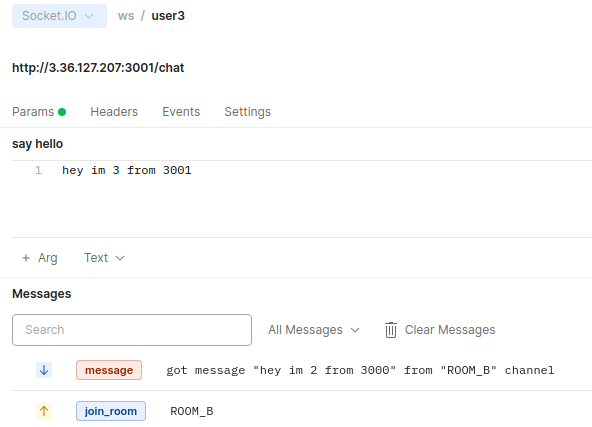
이번에도 3000, 3001 두 포트에서 프로세스를 실행시킨 후 채팅 테스트를 해봤다.
유저1: 3000포트, ROOM_A
유저2: 3000포트, ROOM_B
유저3: 3001포트, ROOM_B
유저1이 메시지를 보냈을 땐 유저2, 3에게 전달되지 않지만 유저2와 3은 메시지를 주고 받을 수 있는 걸 확인했다.
테스트 상황을 도식화 하면 아래와 같다

이제 세세한 구현과 ecs에 배포가 남았다.